Tutorial: a real world sample
Demonstration : configuring (the setting of) your favorite web browser
This tutorial shows to you an example of Rougail use on how to set a proxy in the Mozilla Firefox browser.
More precisely, this tutorial aims at reproducing this Mozilla Firefox settings page:
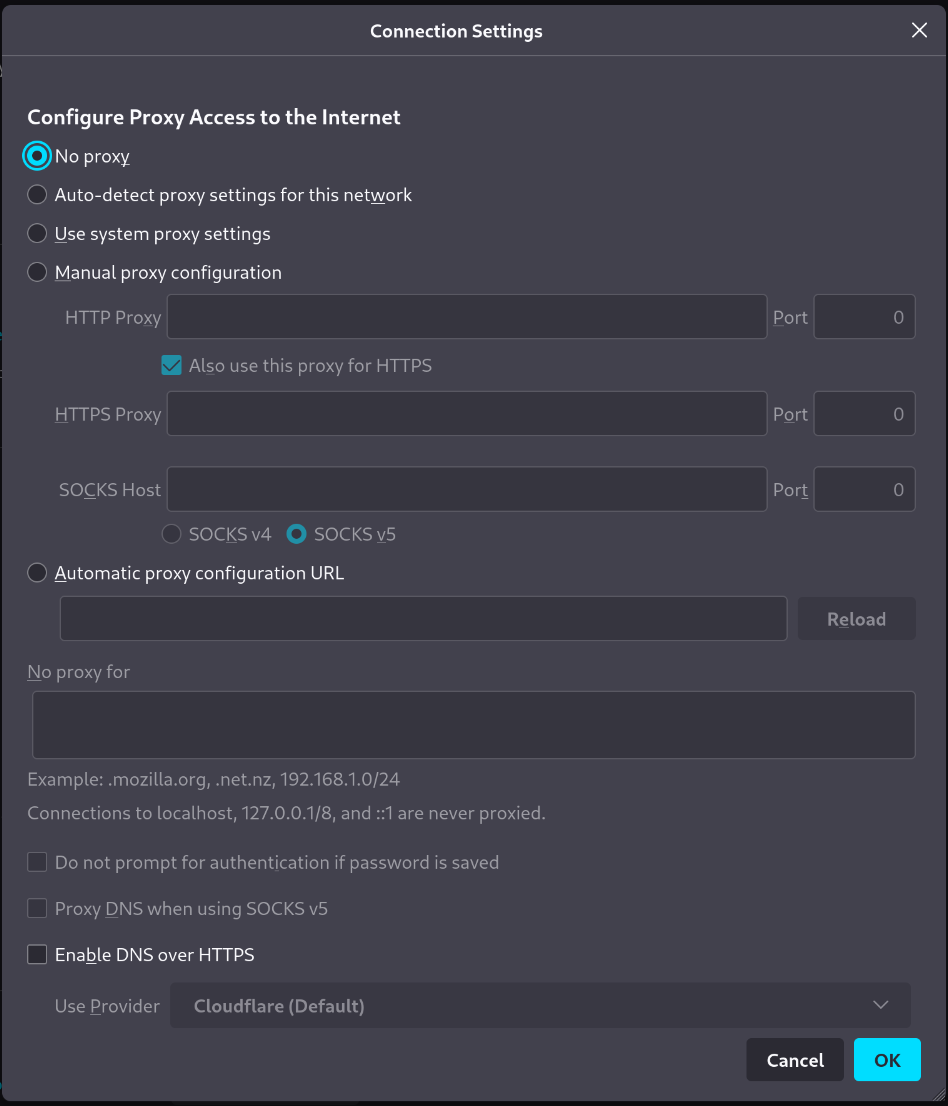
Important
Here we are in the configuration validation use case, that is the values entered by the user have to be validated. It’s a common use case, but not the only one.
Let’s explain this use case.
The Firefox proxy configuration
The proxy family
Let’s create our first dictionary.
Let’s create a folder named dict and a dictionary file inside
We will put our dictionary files in this folder.
Then let’s put our first dictionary file in this folder, named 00-proxy.yml
00-proxy.yml file1 ---
2 version: '1.0'
3 proxy:
4 description: Proxy configuration in order to have access to the internet
5 type: family
We can see that we have defined a family here, and this family is empty (that is, the family container contains no variable yet).
If a family is empty
We need to specify the family type (line 5) here because if we don’t, the Rougail’s type engine will infer it by default as a variable.
It’s because we don’t have set any variable inside.
Note
The variables will be created in several files for educational purposes. Obviously all the variables can be put in the same file.
The proxy’s configuration type
In the Firefox configuration, it is possible to define several configuration modes,
from no proxy at all (no proxy) to a kind of automatic configuration mode from a file (set up proxy configuration from a file).
We’re gonna create a first variable in this family with “Proxy mode” as the description.
Let’s create a second dict/01-proxy_mode.yml file.
001-proxy_mode.yml file 1 ---
2 version: '1.0'
3 proxy:
4 proxy_mode:
5 description: Proxy mode
6 type: choice
7 choices:
8 - No proxy
9 - Auto-detect proxy settings for this network
10 - Use system proxy settings
11 - Manual proxy configuration
12 - Automatic proxy configuration URL
13 default: No proxy
The proxy_mode variable requires a value (that is, None is not an option).
It shall have a value, but what if the user does not specify any value?
There is line 13, a possibility of setting a default value, wich is No proxy as the default.
The proxy_mode setting is “choice” (type: choice) means that
there is a list of available values that can be selected.
We say that the proxy_mode variable is constrained (by choices).
Line 8 to 12, we have the list of the possible (authorized) values:
No proxy
Auto-detect proxy settings for this network
Use system proxy settings
Manual proxy configuration
Automatic proxy configuration URL
Now let’s test our first two dictionaries:
>>> from rougail import Rougail, RougailConfig
>>> from pprint import pprint
>>> RougailConfig['dictionaries_dir'] = ['dict']
>>> rougail = Rougail()
>>> config = rougail.get_config()
>>> config.property.read_only()
>>> pprint(config.value.get(), sort_dicts=False)
{'rougail.proxy.proxy_mode': 'No proxy'}
The manual mode
OK then. What happens when you select the “Manual proxy configuration”?
A good configuration design is to place all the proxy’s manual configuration in a family.
Let’s create the dict/02-proxy_manual.yml dictionary:
dict/02-proxy_manual.yml file ---
version: '1.0'
proxy:
manual:
description: Manual proxy configuration
type: family
disabled:
type: jinja
jinja: |
{% if rougail.proxy.proxy_mode != 'Manual proxy configuration' %}
the proxy mode is not manual
{% endif %}
Well, if the user selects the “Manual proxy configuration” proxy mode, we want to see a new subfamily (that is, a new set of configuration variables) called manual to appear (which is disabled).
- subfamily
A subfamily is just a family inside a family, a family that contains a family.
What about this Jinja type?
If the Jinja template returns some text, then the family will be disabled. Otherwise it is accessible.
Deactivating a family means that we will not be able to access it as well as the variables or families included in this family.
Note
If the Jinja template does not return any text, the variable will be enabled. Here we are using the Jinja condition statement.
The HTTP proxy configuration
In this family let’s add a subfamily named http_proxy, containing the address and port configuration variables.
Let’s create the dict/03-proxy_manual_http_proxy.yml dictionary:
dict/02-proxy_manual.yml file 1 ---
2 version: '1.0'
3 proxy:
4 manual:
5 http_proxy:
6 description: HTTP Proxy
7 address:
8 description: HTTP address
9 type: domainname
10 port:
11 description: HTTP Port
12 type: port
13 default: '8080'
Both variables address and port have particular types (respectively domainname line 9 and port line 12) to validate the values configured by the user.
Note
No need to specify the type of the http_proxy as a family type, because here we have declared variables inside of it.
Duplicating the HTTP configuration to HTTPS
We then want to offer the user the possibility of providing the same proxy for the HTTPS requests. Let’s create the dict/04-proxy_manual_http_use_for_https.yml file:
dict/04-proxy_manual_http_use_for_https.yml file version: '1.0'
proxy:
manual:
use_for_https:
description: Also use this proxy for HTTPS
type: boolean
This variable is a boolean type, its default value is True.
HTTPS proxy configuration detail
Let’s add a new subfamily named ssl_proxy, containing the address and port variables.
Let’s create the dict/05-proxy_manual_ssl_proxy.yml file:
dict/04-proxy_manual_http_use_for_https.yml file 1 ---
2 version: '1.0'
3 proxy:
4 manual:
5 ssl_proxy:
6 description: HTTPS Proxy
7 hidden:
8 type: variable
9 variable: rougail.proxy.manual.use_for_https
10 address:
11 description: HTTPS address
12 type: domainname
13 default:
14 type: jinja
15 jinja: |
16 {% if rougail.proxy.manual.use_for_https %}
17 {{ rougail.proxy.manual.http_proxy.address }}
18 {% endif %}
19 port:
20 description: HTTPS Port
21 type: port
22 default:
23 type: jinja
24 jinja: |
25 {% if rougail.proxy.manual.use_for_https %}
26 {{ rougail.proxy.manual.http_proxy.port }}
27 {% endif %}
Depending on the value of the rougail.proxy.mandatory.use_for_https variable, this family will appear or disappear (the hidden setting line 7). Unlike earlier, this time it is not necessary to use a Jinja function.
Let’s notice that the family is not disabled because the variables will need to remain accessible (yet in read-only mode).
The address and port variables are copied from HTTP to HTTPS if rougail.proxy.use_for_https is set to True.
Now let’s test all of it:
>>> from rougail import Rougail, RougailConfig
>>> from pprint import pprint
>>> RougailConfig['dictionaries_dir'] = ['dict']
>>> rougail = Rougail()
>>> config = rougail.get_config()
>>> config.property.read_only()
>>> pprint(config.value.get(), sort_dicts=False)
{'rougail.proxy.proxy_mode': 'No proxy'}
At this time the proxy is not configured yet, so we do not see any variables.
Let’s look at what happens if we try to access the rougail.proxy.manual variable if we are not in manual mode:
>>> pprint(config.option('rougail.proxy.manual').value.get(), sort_dicts=False)
We have an error (with the message defined in the Jinja template):
tiramisu.error.PropertiesOptionError: cannot access to optiondescription "Manual proxy configuration" because has property "disabled" (the mode proxy is not manual)
Let’s configure the proxy in manual mode
>>> config.property.read_write()
>>> config.option('rougail.proxy.proxy_mode').value.set('Manual proxy configuration')
>>> config.option('rougail.proxy.manual.http_proxy.address').value.set('proxy.example')
>>> pprint(config.value.get(), sort_dicts=False)
We can see that the returned variables does have the desired values:
{'rougail.proxy.proxy_mode': 'Manual proxy configuration',
 'rougail.proxy.manual.http_proxy.address': 'proxy.example',
 'rougail.proxy.manual.http_proxy.port': '8080',
 'rougail.proxy.manual.use_for_https': True}
Let’s set the read_only mode:
>>> config.property.read_only()
>>> pprint(config.value.get(), sort_dicts=False)
{'rougail.proxy.proxy_mode': 'Manual proxy configuration',
 'rougail.proxy.manual.http_proxy.address': 'proxy.example',
 'rougail.proxy.manual.http_proxy.port': '8080',
 'rougail.proxy.manual.use_for_https': True,
 'rougail.proxy.manual.ssl_proxy.address': 'proxy.example',
 'rougail.proxy.manual.ssl_proxy.port': '8080'}
In the read_only mode, we can see that the HTTPS configuration appears.
Note
We can see that rougail.proxy.manual.http_proxy values have been copied
in rougail.proxy.manual.ssl_proxy too…
Changing values programmatically
We are going to use the Tiramisu API to manipulate programmatically the different variables.
First, let’s set rougail.proxy.manual.use_for_https to False. It is now possible
to configure the HTTPS:
>>> config.property.read_write()
>>> config.option('rougail.proxy.manual.use_for_https').value.set(False)
>>> config.option('rougail.proxy.manual.ssl_proxy.address').value.set('other.proxy.example')
>>> pprint(config.value.get(), sort_dicts=False)
{'rougail.proxy.proxy_mode': 'Manual proxy configuration',
 'rougail.proxy.manual.http_proxy.address': 'proxy.example',
 'rougail.proxy.manual.http_proxy.port': '8080',
 'rougail.proxy.manual.use_for_https': False,
 'rougail.proxy.manual.ssl_proxy.address': 'other.proxy.example',
 'rougail.proxy.manual.ssl_proxy.port': '8080'}
The value of the variable rougail.proxy.manual.ssl_proxy.address has actually been modified.
But if this variable is hidden again, then the value comes back to the default value:
>>> config.option('rougail.proxy.manual.use_for_https').value.set(False)
>>> config.property.read_only()
>>> pprint(config.value.get(), sort_dicts=False)
{'rougail.proxy.proxy_mode': 'Manual proxy configuration',
 'rougail.proxy.manual.http_proxy.address': 'proxy.example',
 'rougail.proxy.manual.http_proxy.port': '8080',
 'rougail.proxy.manual.use_for_https': False,
 'rougail.proxy.manual.ssl_proxy.address': 'proxy.example',
 'rougail.proxy.manual.ssl_proxy.port': '8080'}
SOCK’s proxy configuration
Let’s add a new subfamily named socks_proxy with the address,
port and version variables.
Let’s create the dict/06-proxy_manual_socks_proxy.yml file:
dict/06-proxy_manual_socks_proxy.yml file ---
version: '1.0'
proxy:
manual:
socks_proxy:
description: SOCKS Proxy
address:
description: SOCKS Address
type: domainname
port:
description: SOCKS Port
type: port
version:
description: SOCKS host version used by proxy
type: choice
choices:
- v4
- v5
default: v5
There’s nothing new to learn with this file.
The automatic detection mode
Let’s add a new variable named auto.
Let’s create the dict/07-proxy_auto.yml file:
dict/07-proxy_auto.yml file ---
version: '1.0'
proxy:
auto:
type: web_address
description: Automatic proxy configuration URL
disabled:
type: jinja
jinja: |
{% if rougail.proxy.proxy_mode != 'Automatic proxy configuration URL' %}
the proxy mode is not automatic
{% endif %}
The web_address type imposes a value starting with http:// or https://.
This variable is activated when the proxy is in automatic mode.
The proxy’s exceptions
Finally, let’s add a variable containing proxy exceptions.
Let’s create the dict/07-proxy_no_proxy.yml file:
dict/07-proxy_no_proxy.yml file 1 ---
2 version: '1.0'
3 proxy:
4 no_proxy:
5 description: Address for which proxy will be desactivated
6 multi: true
7 type: "domainname"
8 params:
9 allow_ip: true
10 allow_cidr_network: true
11 allow_without_dot: true
12 allow_startswith_dot: true
13 disabled:
14 type: jinja
15 jinja: |
16 {% if rougail.proxy.proxy_mode == 'No proxy' %}
17 proxy mode is no proxy
18 {% endif %}
19 mandatory: false
This no_proxy variable is much like a domainname type except that we add
a params line 7, we authorize the :
IP
CIDR networks
machine names (without
'.')sub-domaines like
.example
There can be multiple exceptions to the proxy, so the variable is multi (line5).
This variable is only accessible if no proxy is defined (disabled).
- multi
A multi is a multiple variable, that is a variable that can have multiple values.
The no_proxy variable do not requires a value (that is, None is an option),
there is line 19 this statement mandatory: false which means that this variable is not mandatory.
Let’s test it:
>>> from rougail import Rougail, RougailConfig
>>> from pprint import pprint
>>> RougailConfig['dictionaries_dir'] = ['dict']
>>> rougail = Rougail()
>>> config = rougail.get_config()
>>> config.property.read_write()
>>> config.option('rougail.proxy.proxy_mode').value.set('Manual proxy configuration')
>>> config.option('rougail.proxy.manual.http_proxy.address').value.set('proxy.example')
>>> config.option('rougail.proxy.no_proxy').value.set(['.example', '192.168.1.1'])
>>> config.property.read_only()
>>> pprint(config.value.get(), sort_dicts=False)
It outputs:
{'rougail.proxy.proxy_mode': 'Manual proxy configuration',
 'rougail.proxy.manual.http_proxy.address': 'proxy.example',
 'rougail.proxy.manual.http_proxy.port': '8080',
 'rougail.proxy.manual.use_for_https': True,
 'rougail.proxy.manual.ssl_proxy.address': 'proxy.example',
 'rougail.proxy.manual.ssl_proxy.port': '8080',
 'rougail.proxy.manual.socks_proxy.address': None,
 'rougail.proxy.manual.socks_proxy.port': None,
 'rougail.proxy.manual.socks_proxy.version': 'v5',
 'rougail.proxy.no_proxy': ['.example', '192.168.1.1']}
But not possible to put an invalid value:
>>> config.option('rougail.proxy.no_proxy').value.set(['.example', '192.168.1.1', 'not valid'])
[..]
tiramisu.error.ValueOptionError: "not valid" is an invalid domain name for "Address for which proxy will be desactivated", could be a IP, otherwise must start with lowercase characters followed by lowercase characters, number, "-" and "." characters are allowed
The authentification request
Nothing special when creating the authentication request. To do this, let’s create a dict/08-proxy_prompt_authentication.yml file:
dict/08-proxy_prompt_authentication.yml file 1 ---
2 version: '1.0'
3 proxy:
4 prompt_authentication:
5 description: Prompt for authentication if password is saved
6 type: boolean
7 default: true
8 disabled:
9 type: jinja
10 jinja: |
11 {% if rougail.proxy.proxy_mode == 'No proxy' %}
12 proxy mode is no proxy
13 {% endif %}
The proxy SOCKS v5’s DNS
The DNS variable for the SOCKS v5 proxy only appears if the proxy is configured and the version of the SOCKS proxy selected is v5.
Let’s create a dict/09-proxy_proxy_dns_socks5.yml file:
dict/09-proxy_proxy_dns_socks5.yml file 1 ---
2 version: '1.0'
3 proxy:
4 proxy_dns_socks5:
5 description: Use proxy DNS when using SOCKS v5
6 type: boolean
7 default: false
8 disabled:
9 type: jinja
10 params:
11 socks_version:
12 type: variable
13 variable: rougail.proxy.manual.socks_proxy.version
14 propertyerror: false
15 jinja: |
16 {% if rougail.proxy.proxy_mode == 'No proxy' %}
17 the proxy mode is no proxy
18 {% elif socks_version is undefined or socks_version == 'v4' %}
19 socks version is v4
20 {% endif %}
The difficulty here is that the rougail.proxy.manual.socks_proxy.version variable
can be deactivated (and therefore not usable in a calculation).
In this case, we will add a parameter (here called socks_version) which will contain,
if there is no property error, the value of the variable.
Otherwise the parameter will not be passed to the Jinja template.
This is why it is necessary to test in the Jinja template whether the socks_version variable really exists.
The DNS over HTTPS
Finally we will configure DNS over HTTPS in the 10-proxy_dns_over_https.yml file:
Let’s create a dict/10-proxy_dns_over_https.yml file:
dict/10-proxy_dns_over_https.yml file 1 ---
2 version: '1.0'
3 proxy:
4 dns_over_https:
5 description: DNS over HTTPS
6 enable_dns_over_https:
7 description: Enable DNS over HTTPS
8 type: boolean
9 default: false
10 provider:
11 description: Use Provider
12 type: choice
13 choices:
14 - Cloudflare
15 - NextDNS
16 - Custom
17 default: Cloudflare
18 disabled:
19 type: jinja
20 jinja: |
21 {% if not rougail.proxy.dns_over_https.enable_dns_over_https %}
22 Enable DNS over HTTPS is False
23 {% endif %}
24 custom_dns_url:
25 description: Custom DNS URL
26 type: web_address
27 disabled:
28 type: jinja
29 params:
30 provider:
31 type: variable
32 variable: rougail.proxy.dns_over_https.provider
33 propertyerror: false
34 jinja: |
35 {% if provider is not defined or provider != 'Custom' %}
36 provider is not custom
37 {% endif %}
38 validators:
39 - type: jinja
40 jinja: |
41 {% if rougail.proxy.dns_over_https.custom_dns_url.startswith('http://') %}
42 only https is allowed
43 {% endif %}
The only particularity here is that we added additional validation (validators) to the custom_dns_url variable. Only an address starting with https:// is allowed (not http://).
The FoxyProxy type’s proxy configuration
Here is now the integration of part of the Firefox FoxyProxy plugin.
The idea is to have a namespace specific to FoxyProxy and to find in it part of the settings that we will have made in the main namespace.
This is what the page looks like:
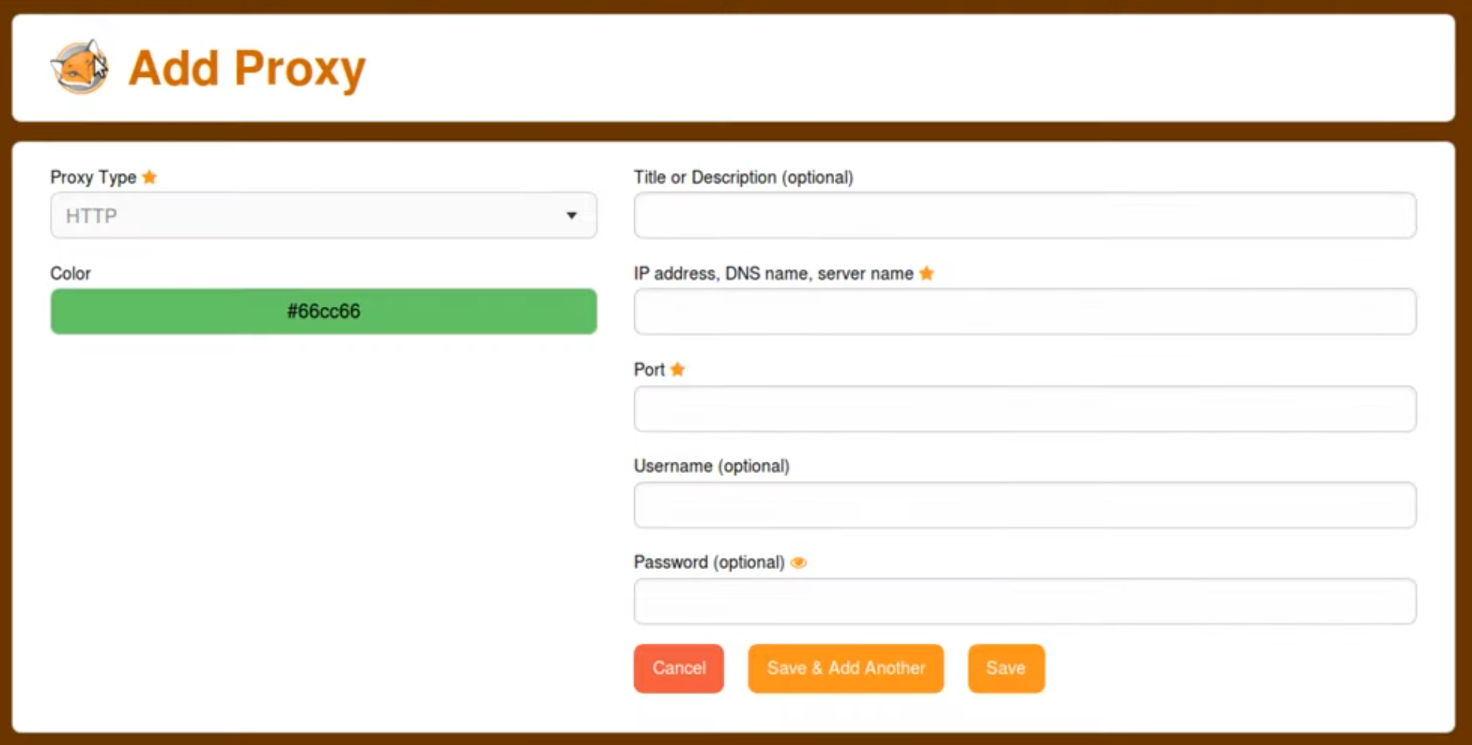
It is possible, in this plugin, to specify an unlimited number of proxies.
Our proxy family will no longer be of the family type as before but of another type : the leadership type.
Here is the complete content of the FoxyProxy type proxy configuration
(to be put in the foxyproxy/00-base.yml file):
foxyproxy/00-base.yml file 1 ---
2 version: '1.0'
3 proxy:
4 _type: leadership
5 title:
6 description: Title or Description
7 multi: true
8 color:
9 description: Color
10 type:
11 type: choice
12 choices:
13 - HTTP
14 - HTTPS/SSL
15 - SOCKS5
16 - SOCKS4
17 - PAC URL
18 - WPAD
19 - System (use system settings)
20 - Direct (no proxy)
21 default: Direct (no proxy)
22 address:
23 description: IP address, DNS name, server name
24 multi: true
25 disabled:
26 type: jinja
27 jinja: |
28 {% if foxyproxy.proxy.type not in ['HTTP', 'HTTPS/SSL', 'SOCKS5', 'SOCKS4'] %}
29 proxy does not need address
30 {% endif %}
31 default:
32 type: jinja
33 params:
34 firefox_address:
35 type: variable
36 variable: rougail.proxy.manual.http_proxy.address
37 propertyerror: false
38 jinja: |
39 {% if firefox_address is not undefined %}
40 {{ firefox_address }}
41 {% endif %}
42 port:
43 description: Port
44 type: port
45 default:
46 type: jinja
47 params:
48 firefox_port:
49 type: variable
50 variable: rougail.proxy.manual.http_proxy.port
51 propertyerror: false
52 jinja: |
53 {% if firefox_port is not undefined %}
54 {{ firefox_port }}
55 {% endif %}
56 disabled:
57 type: jinja
58 jinja: |
59 {% if foxyproxy.proxy.type not in ['HTTP', 'HTTPS/SSL', 'SOCKS5', 'SOCKS4'] %}
60 proxy does not need port
61 {% endif %}
62 username:
63 description: Username
64 type: unix_user
65 mandatory:
66 type: jinja
67 jinja: |
68 {% if foxyproxy.proxy.password %}
69 username is mandatory
70 {% endif %}
71 disabled:
72 type: jinja
73 jinja: |
74 {% if foxyproxy.proxy.type not in ['HTTP', 'HTTPS/SSL', 'SOCKS5', 'SOCKS4'] %}
75 proxy does not need username
76 {% endif %}
77 password:
78 description: Password
79 type: secret
80 disabled:
81 type: jinja
82 jinja: |
83 {% if foxyproxy.proxy.type not in ['HTTP', 'HTTPS/SSL', 'SOCKS5', 'SOCKS4'] %}
84 proxy does not need password
85 {% endif %}
86 url:
87 type: web_address
88 disabled:
89 type: jinja
90 jinja: |
91 {% if foxyproxy.proxy.type not in ['PAC URL', 'WPAD'] %}
92 proxy does not need url
93 {% endif %}
A few comments:
in the
foxyproxy.proxyleader family there is a variable namedtype(line 4), this may conflict with thetypeattribute (specified line 10). In this case, to specify the type we use the_typeattributea follower variable can also be multiple (which is the case for
foxyproxy.proxy.address)foxyproxy.proxy.username(line 62) becomes mandatory iffoxyproxy.proxy.passwordis specified, in fact a password without a username is meaningless
Let’s test it:
>>> from rougail import Rougail, RougailConfig
>>> from pprint import pprint
>>> RougailConfig['dictionaries_dir'] = ['dict']
>>> RougailConfig['extra_dictionaries']['foxyproxy'] = ['foxyproxy/']
>>> rougail = Rougail()
>>> config = rougail.get_config()
>>> config.option('rougail.proxy.proxy_mode').value.set('Manual proxy configuration')
>>> config.option('rougail.proxy.manual.http_proxy.address').value.set('proxy.example')
>>> config.option('foxyproxy.proxy.title').value.set(['MyProxy'])
>>> config.option('foxyproxy.proxy.type', 0).value.set('HTTP')
>>> config.option('foxyproxy.proxy.color', 0).value.set('#00000')
>>> config.property.read_only()
>>> pprint(config.value.get(), sort_dicts=False)
The output is:
{'rougail.proxy.proxy_mode': 'Manual proxy configuration',
 'rougail.proxy.manual.http_proxy.address': 'proxy.example',
 'rougail.proxy.manual.http_proxy.port': '8080',
 'rougail.proxy.manual.use_for_https': True,
 'rougail.proxy.manual.ssl_proxy.address': 'proxy.example',
 'rougail.proxy.manual.ssl_proxy.port': '8080',
 'rougail.proxy.manual.socks_proxy.address': None,
 'rougail.proxy.manual.socks_proxy.port': None,
 'rougail.proxy.manual.socks_proxy.version': 'v5',
 'rougail.proxy.no_proxy': [],
 'rougail.proxy.proxy_dns_socks5': False,
 'rougail.proxy.dns_over_https.enable_dns_over_https': False,
 'foxyproxy.proxy.title': [{'foxyproxy.proxy.title': 'MyProxy',
                            'foxyproxy.proxy.color': '#00000',
                            'foxyproxy.proxy.type': 'HTTP',
                            'foxyproxy.proxy.address': ['proxy.example'],
                            'foxyproxy.proxy.port': '8080',
                            'foxyproxy.proxy.username': None,
                            'foxyproxy.proxy.password': None}]}
The choice we made here is to make foxyproxy.proxy.username mandatory if a password is specified in the foxyproxy.proxy.password variable.
It makes sense to have a username without a password (in this case the password will be requested when connecting to the proxy). But the opposite does not make sense.
From a user point of view this may seem disturbing (if you enter the password, you have to return to the previous option to specify the password).
It is possible to reverse the logic. If the foxyproxy.proxy.username variable is set, the foxyproxy.proxy.password variable becomes editable.
None of this two variables needs to be mandatory.
If you prefer this option, here is a second extra dictionary foxyproxy/01-redefine.yml which will redefine the behavior only of the foxyproxy.proxy.username and foxyproxy.proxy.password variables:
foxyproxy/01-redefine.yml file 1 ---
2 version: '1.0'
3 proxy:
4 username:
5 redefine: true
6 # suppress mandatory constrainte
7 mandatory: false
8 password:
9 redefine: true
10 hidden:
11 type: jinja
12 jinja: |
13 {% if not foxyproxy.proxy.username %}
14 no username defined
15 {% endif %}
It’s up to you to play now !