Variable calculation with propertyerror
Objectives
In a variable-type calculation, it is possible to test if a variable is accessible (there is no Access control problem).
Prerequisites
We assume that Rougail’s library is installed on your computer.
It is possible to retrieve the current state of the various Rougail files manipulated in this tutorial step by checking out the corresponding tag of the
rougail-tutorialsgit repository. Each tag corresponds to a stage of progress in the tutorial. Of course, you can also decide to copy/paste or download the tutorial files contents while following the tutorial steps.
If you want to follow this tutorial with the help of the corresponding rougail-tutorials git repository, this workshop page corresponds to the tag v1.1_230 in the repository:
git clone https://forge.cloud.silique.fr/stove/rougail-tutorials.git
git switch --detach v1.1_230
We have now to add three new variables:
A variable with type domainname
addressthat allow IP and hostname, this variable is accessible in type HTTP, HTTPS/SSL, SOCKS4 or SOCKS5A variable with type port, this variable is accessible in type HTTP, HTTPS/SSL, SOCKS4 or SOCKS5
A web_address variable URL, this variable is accessible in type PAC URL or WPAD
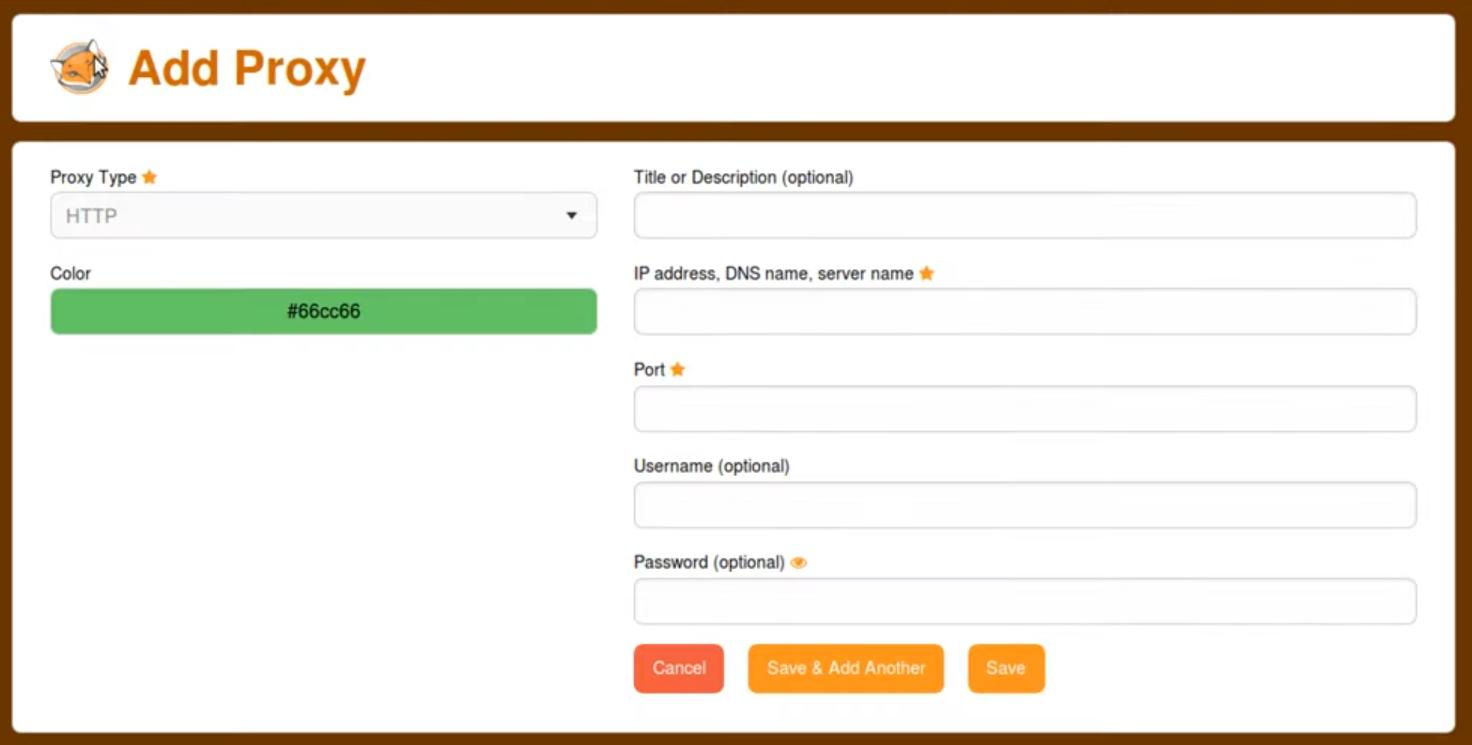
There is a particularity to these three variables. We want to copy the values of the equivalent variables available in Firefox. The reason is obvious; it simplifies data entry.
Variables are not always available. It is possible to test their presence in a Jinja template, as we have already seen.
But it’s not the most effective. It is preferable to perform a variable-type calculation using the property propertyerror to false.
This property allows you to disable errors in case of access problems.
Let’s start by modifying the structure file:
foxyproxy/00-foxyproxy.yml%YAML 1.2
---
version: 1.1
proxies:
description: Proxy configuration
_type: sequence
title:
description: Title or Description
mandatory: false
type:
description: Proxy Type
choices:
- HTTP
- HTTPS/SSL
- SOCKS4
- SOCKS5
- PAC URL
- WPAD
- System (use system settings)
- Direct (no proxy)
default: Direct (no proxy)
color:
description: Color
regexp: ^#(?:[0-9a-f]{3}){1,2}$
default:
jinja: >-
#{%- for i in range(6) -%}{{- '0123456789abcdef' | random -}}{%- endfor -%}
description: random color value
auto_save: true
address:
description: IP address, DNS name, server name
type: domainname
params:
allow_ip: true
allow_without_dot: true
default:
description: copy HTTP address if proxy is not "Manual"
variable: firefox.manual.http_proxy.address
propertyerror: false
disabled:
jinja: |-
{{ _.type not in ['HTTP', 'HTTPS/SSL', 'SOCKS4', 'SOCKS5'] }}
return_type: boolean
description: |-
if type not in:
- HTTP
- HTTPS/SSL
- SOCKS4
- SOCKS5
port:
description: Port
type: port
default:
description: copy HTTP port if proxy is not "Manual"
variable: firefox.manual.http_proxy.port
propertyerror: false
disabled:
jinja: |-
{{ _.type not in ['HTTP', 'HTTPS/SSL', 'SOCKS4', 'SOCKS5'] }}
return_type: boolean
description: |-
if type not in:
- HTTP
- HTTPS/SSL
- SOCKS4
- SOCKS5
url:
description: URL
type: web_address
default:
description: copy HTTP address if proxy is "Auto"
variable: firefox.auto
propertyerror: false
disabled:
jinja: |-
{{ _.type not in ['PAC URL', 'WPAD'] }}
return_type: boolean
description: |-
if type is not in:
- PAC URL
- WPAD
...
If the variable is accessible, there’s no question about it; the variable retrieves its value. But what happens if the variable is not accessible?
In this case, the value of the variable is null.
Don’t just take my word for it, let’s do a test.
Now let’s test with the following user data file:
config/02/config.yml user data1---
2foxyproxy:
3 proxies:
4 - title: My company
5 type: HTTP
6 color: '#66cc66'
The proxy in the Firefox namespace is not defined, so the address and port variables are not accessible.
A proxy is configured in FoxyProxy, but also without address or port.
If we launch the Rougail CLI:
We have this output:
🛑 Caution
┗━━ foxyproxy (FoxyProxy)
    ┗━━ proxies (Proxy configuration)
        ┣━━ address (IP address, DNS name, server name): 🛑 mandatory variable
        ┃   at index "0" but has no value
        ┗━━ port (Port): 🛑 mandatory variable at index "0" but has no value
As expected, calculating the default value works without issue even though the variables involved in the calculations are inaccessible.
The values are therefore null. These variables are not nullable, so the overall coherence of the Configuration is not guaranteed.
Now try it in the read write mode with the Rougail CLI:
The variables has really the value null:
╭────────────── Caption ───────────────╮
│ Variable Default value               │
│          Modified value              │
│          (⏳ Original default value) │
╰──────────────────────────────────────╯
Variables:
┣━━ 📂 firefox (Firefox)
┃   ┣━━ 📓 proxy_mode (Configure Proxy Access to the Internet): No proxy
┃   ┗━━ 📂 dns_over_https (DNS over HTTPS)
┃       ┗━━ 📓 enable_dns_over_https (Enable DNS over HTTPS): false
┗━━ 📂 foxyproxy (FoxyProxy)
    ┗━━ 📂 proxies (Proxy configuration)
        ┗━━ 📂 title (Title or Description)
            ┣━━ 📓 title (Title or Description): My company ◀ loaded from the
            ┃   YAML file "config/02/config.yml"
            ┣━━ 📓 type (Proxy Type): HTTP ◀ loaded from the YAML file
            ┃   "config/02/config.yml" (⏳ Direct (no proxy))
            ┣━━ 📓 color (Color): #66cc66 ◀ loaded from the YAML file
            ┃   "config/02/config.yml"
            ┣━━ 📓 address (IP address, DNS name, server name): null
            ┗━━ 📓 port (Port): null
Now let’s configure the variables in the Firefox namespace:
config/04/config.yml user data 1---
2firefox:
3 proxy_mode: Manual proxy configuration
4 manual:
5 http_proxy:
6 address: http.proxy.net
7 port: 3128
8 use_for_https: false
9 https_proxy:
10 address: https.proxy.net
11foxyproxy:
12 proxies:
13 - title: My company
14 type: HTTP
15 color: '#66cc66'
As you can see, the address and port are defined in the Firefox namespace but not in the FoxyProxy namespace.
If we launch the Rougail CLI:
We have this output:
╭────────────── Caption ───────────────╮
│ Variable Default value               │
│          Modified value              │
│          (⏳ Original default value) │
╰──────────────────────────────────────╯
Variables:
┣━━ 📂 firefox (Firefox)
┃   ┣━━ 📓 proxy_mode (Configure Proxy Access to the Internet): Manual proxy
┃   ┃   configuration ◀ loaded from the YAML file "config/04/config.yml" (⏳ No
┃   ┃   proxy)
┃   ┣━━ 📂 manual (Manual proxy configuration)
┃   ┃   ┣━━ 📂 http_proxy (HTTP Proxy)
┃   ┃   ┃   ┣━━ 📓 address (HTTP proxy address): http.proxy.net ◀ loaded from
┃   ┃   ┃   ┃   the YAML file "config/04/config.yml"
┃   ┃   ┃   ┗━━ 📓 port (HTTP proxy port): 3128 ◀ loaded from the YAML file
┃   ┃   ┃       "config/04/config.yml" (⏳ 8080)
┃   ┃   ┣━━ 📓 use_for_https (Also use this proxy for HTTPS): false ◀ loaded
┃   ┃   ┃   from the YAML file "config/04/config.yml" (⏳ true)
┃   ┃   ┣━━ 📂 https_proxy (HTTPS Proxy)
┃   ┃   ┃   ┣━━ 📓 address (HTTPS proxy address): https.proxy.net ◀ loaded from
┃   ┃   ┃   ┃   the YAML file "config/04/config.yml" (⏳ http.proxy.net)
┃   ┃   ┃   ┗━━ 📓 port (HTTPS proxy port): 3128
┃   ┃   ┗━━ 📂 socks_proxy (SOCKS Proxy)
┃   ┃       ┗━━ 📓 address (SOCKS proxy address): null
┃   ┣━━ 📓 no_proxy (Address for which proxy will be desactivated): []
┃   ┣━━ 📓 prompt_authentication (Prompt for authentication if password is
┃   ┃   saved): true
┃   ┗━━ 📂 dns_over_https (DNS over HTTPS)
┃       ┗━━ 📓 enable_dns_over_https (Enable DNS over HTTPS): false
┗━━ 📂 foxyproxy (FoxyProxy)
    ┗━━ 📂 proxies (Proxy configuration)
        ┗━━ 📂 title (Title or Description)
            ┣━━ 📓 title (Title or Description): My company ◀ loaded from the
            ┃   YAML file "config/04/config.yml"
            ┣━━ 📓 type (Proxy Type): HTTP ◀ loaded from the YAML file
            ┃   "config/04/config.yml" (⏳ Direct (no proxy))
            ┣━━ 📓 color (Color): #66cc66 ◀ loaded from the YAML file
            ┃   "config/04/config.yml"
            ┣━━ 📓 address (IP address, DNS name, server name): http.proxy.net
            ┗━━ 📓 port (Port): 3128
As expected, the Firefox namespace values are correctly copied into the FoxyProxy namespace.
Key points
We have seen that we can use the test propertyerror in Variable calculation.